
Track your Google Maps rankings every morning
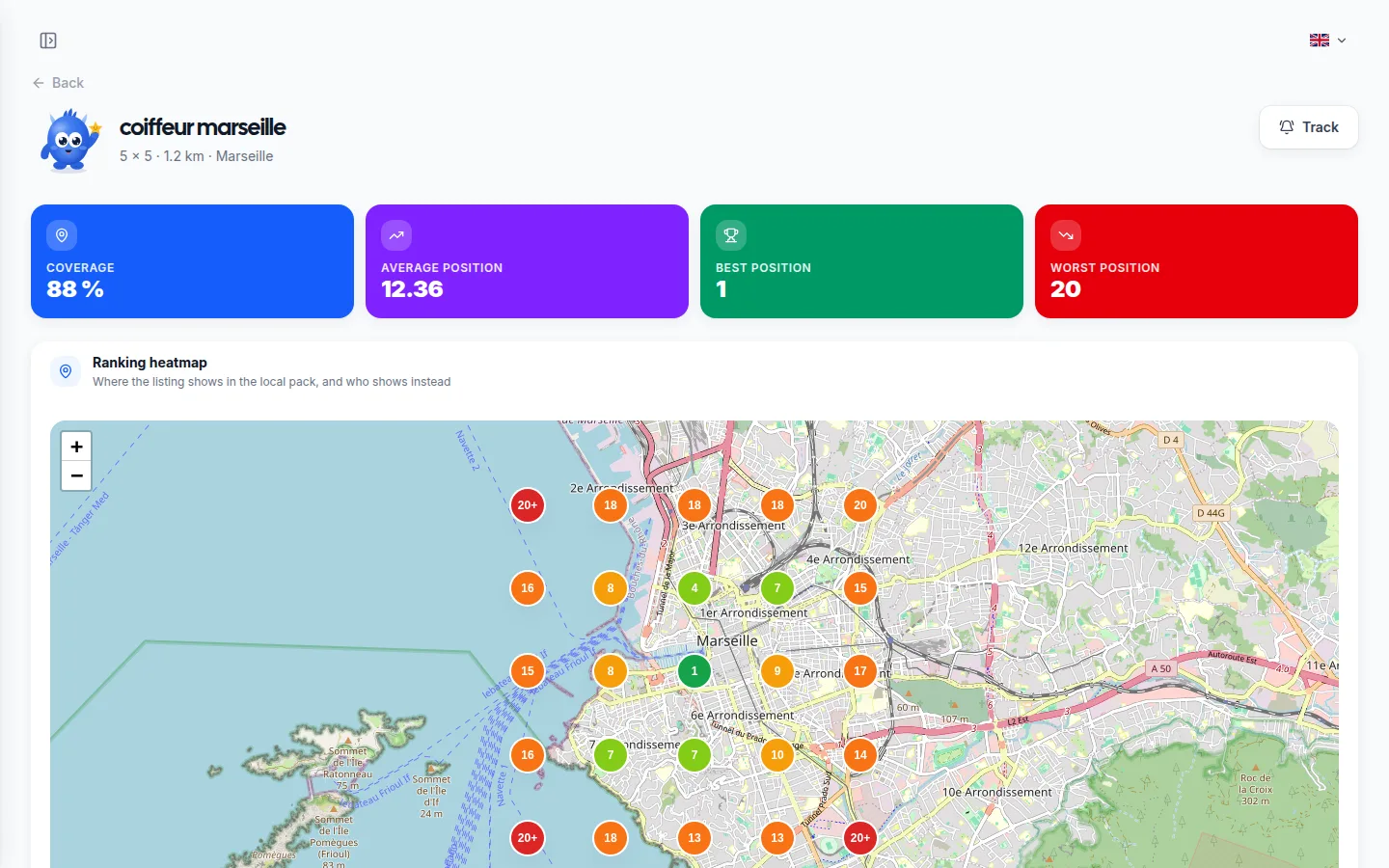
Your ranking is not the same from one street to the next. A business that comes first outside its own door can be invisible three blocks away, and a single number will never tell you that. The heatmap queries Google from dozens of points around you and draws the map of your positions. Put a keyword under tracking and it runs again on its own every morning, so you watch the curve climb.
No credit card • 14 days free • No commitment
Your day-to-day
Your challenges and how Lokvi helps
The problem
Your daily challenges
- An average position tells you nothing: it hides the areas where your business never shows up
- Ordinary rank trackers measure the web, not the Google Maps local pack
- There is no way to tell whether the work on your profile actually paid off
- You find out weeks later that a competitor has moved ahead of you
The solution
How Lokvi helps you
- A grid of points around your address, each one queried separately
- The map colours every point according to your rank, from green to red
- A keyword under tracking is read again every morning, with nothing to relaunch by hand
- A coverage and average position curve shows your progress over time
How it works
Local rank tracking step by step
You pick a keyword and a starting point
The grid size and spacing decide the area covered, with a preview before you launch.
Every point is queried on its own
Google answers as if it were consulted from that exact spot, and the map fills in.
Tracking repeats the reading every morning
A coverage and average position curve builds up reading after reading.
Why it's useful
Concrete benefits for your business
The truth per area, not an average
An average position blends the street where you come first with the one where you are absent. The map separates the two and shows exactly where the work is left to do.
One reading a day, without thinking about it
A keyword under tracking is read again automatically every morning. You open the page whenever you like and the curve is already up to date.
You see who shows up instead of you
Every point on the map keeps the full ranking Google displayed. Click a cell and you read the businesses holding that ground.
Proof that your effort is paying off
Reviews collected, posts published, profile completed: the coverage curve makes visible what used to be a hunch.
A measured comparison with a competitor
Open the profile ahead of you and read, field by field, what it shows that you do not show yet.
Spending capped in advance
Every account has a monthly cap and the estimate appears before you launch a grid. Nothing goes out without you knowing the cost.
The difference
Without Lokvi vs with Lokvi
Without Lokvi
The situation today
- A single position, supposed to stand for the whole town.
- No way to know where your profile stops appearing.
- Progress is guesswork, with no curve to confirm it.
- A competitor moves ahead and nobody sees it coming.
With Lokvi
What changes every day
- A map that colours your rank point by point.
- The exact edge of your visibility area, readable at a glance.
- One reading every morning and a curve that climbs or falls.
- The full ranking of every point, competitors included.
Examples
Real use cases
High street business
On a street where several businesses compete for the same search, the map shows from what distance your profile drops off and which area deserves the effort.
Tradesperson who travels
A service area covers several towns. The grid tells you which ones bring you calls and which ones never see you appear.
After a move
Changing address shifts the whole local ranking. One reading before, one after, and the gap is on the map instead of being guesswork.
Measuring a review campaign
Reviews collected weigh on local ranking. Daily tracking shows when the curve starts to move, and by how much.
Several locations to compare
An owner with two or three sites sees at a glance which one is slipping and which one is holding its area.
A competitor on the rise
When a nearby profile gains ground, the field by field comparison says what it shows that you do not, before you lose more weeks.
Choosing your next keyword
The queries already bringing views to your profile are offered when you launch: you track what customers actually type.
Justifying a visibility budget
A map before and a map after beat any speech when you need to show a partner what the work changed.
A new opening
In the first weeks a profile starts from far behind. Daily tracking shows the ground gained day after day rather than one isolated figure.
Also
A solution tailored to your business
Trade Professional
Completed jobs turn into Google reviews, your photos go out automatically, and past customers think of you when a neighbor asks who to call.
Discover →Retailer
More recent reviews, a listing that stays active all year, and a loyalty card in your regulars' phones, without changing your day-to-day routine.
Discover →Restaurant / Catering
Every service brings in reviews, your current dishes show on your profile, and regulars come back with a loyalty card they never lose.
Discover →Beauty / healthcare professional
Clients leave a review after their appointment, your work keeps your listing active, and the loyalty card brings back those who tend to wait too long.
Discover →Farmer
Your opening hours, seasonal produce and reviews stay up to date on Google, and your regular customers get notified when the harvest is ready.
Discover →Service provider
Every job can turn into a review, replies go out within hours, and your Google listing keeps working while you're with customers.
Discover →Real estate agent
Your recent sales turn into reviews, your listings and updates appear on your profile, and past clients keep recommending you.
Discover →Auto repair shop
After every visit, the review request goes out automatically, so do the replies, and your listing climbs above nearby repair shops.
Discover →Other Small Businesses
An up-to-date Google Business profile, reviews that come in automatically, regular posts and a loyalty program, whatever your business.
Discover →Also
Discover other features
Automated review requests
Automatic SMS and email follow-ups on day 0, day 3 and day 5 to turn happy customers into Google reviews.
Learn more →Automatic review replies
AI writes and publishes a personalized reply to every new Google review, in your business's tone of voice.
Learn more →Automatic Google Posts
AI writes and publishes text and image posts on your Google profile regularly, so your business stays visible and active.
Learn more →Automatic photos
AI generated photos are added to your Google listing on a regular basis to show a business that feels active and up to date.
Learn more →Google profile audit
A clear, practical score for how complete your Google profile is, based on local SEO best practices.
Learn more →Loyalty Program
Stamp or points loyalty card, right in Apple Wallet and Google Wallet, with push notifications.
Learn more →One-click website
A polished public page with your contact details, opening hours and all your useful links, ready to share anywhere.
Learn more →Newsletter
A contact list that fills itself from your other tools, so you can send updates by email or SMS.
Learn more →FAQ
Frequently asked questions
A keyword under tracking is read again every morning, automatically. Other grids stay one-off readings that you relaunch whenever you want.
Local ranking depends on where the search comes from. A business can be first on its own pavement and absent three streets away: a single measurement would never show it.
From 9 to 49 points depending on the grid size, with adjustable spacing. The preview shows the area covered and the number of points before you launch.
They come from the Google Maps local pack, queried from the coordinates of each point. It is the same list a customer would see searching from that spot.
Yes, up to your account limit on active tracking. Each one is read again every morning and keeps its own history.
The readings already taken stay available. The keyword simply stops being read in the morning, and the curve ends where you left it.