
Automatic Google Business posts with AI weekly
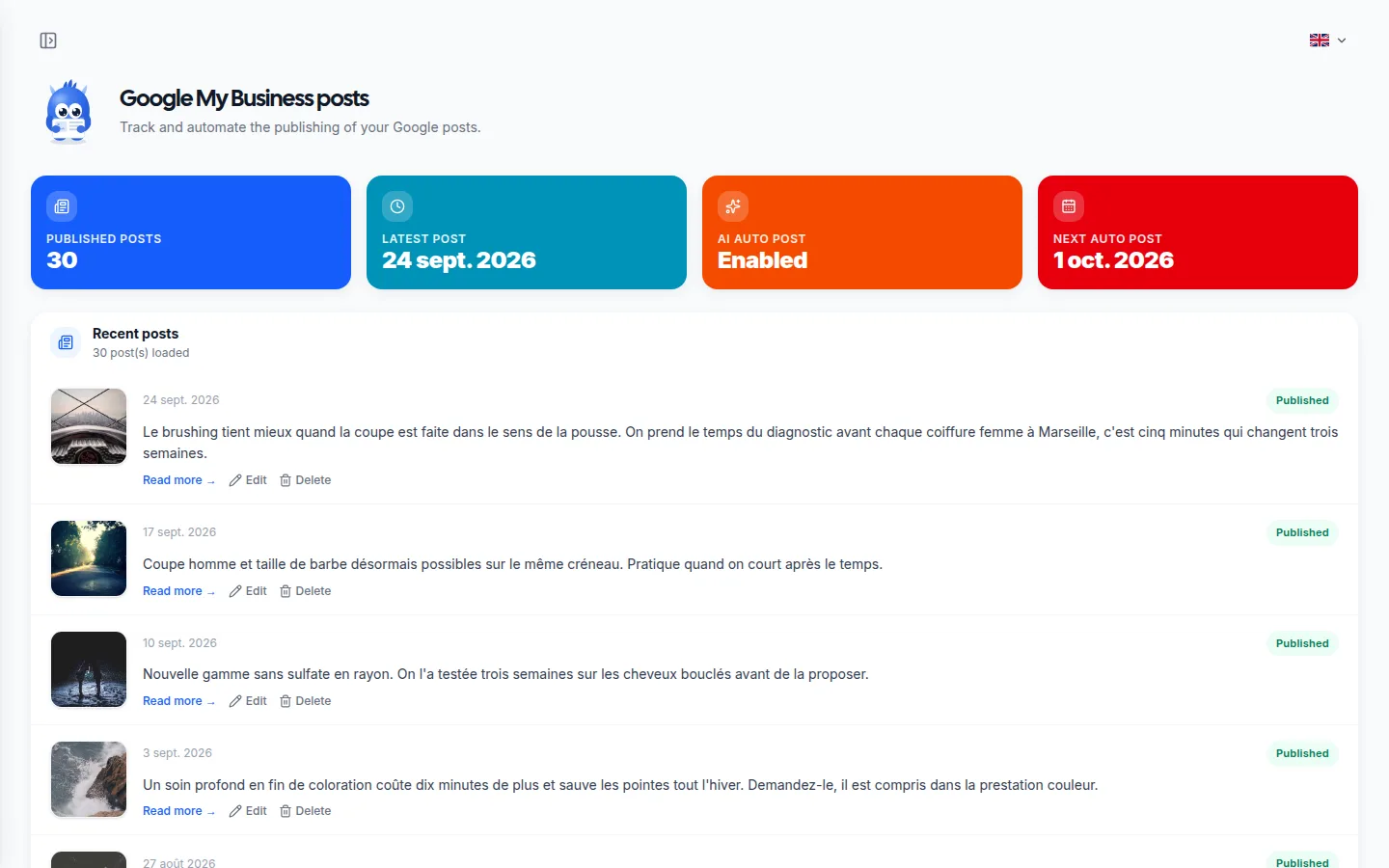
A profile with no posts can make your business look inactive. Posts are written from your business activity and the wording used in your reviews, illustrated in a style you set at the start, and published on a regular schedule. Each one can be approved, edited or rejected before it goes live.
No credit card • 14 days free • No commitment
Your day-to-day
Your challenges and how Lokvi helps
The problem
Your daily challenges
- Posting every week means coming up with an idea, a caption and an image every single time
- Good habits at the start usually fade after a few weeks
- Without major news, it is hard to know what to post on your profile
- A profile with no recent posts can make your business look inactive
The solution
How Lokvi helps you
- Text and visuals are generated from the context of your business
- You set the posting frequency once, then posts go out on their own
- Each post keeps your tone, without generic wording
- You stay in control with manual approval for as long as you want
How it works
Automatic Google Posts step by step
AI writes the post text
Text tailored to your business is written from your brand context.
An original image is created
A visual that matches your identity goes with the post, without using stock images.
Approve it or let it publish automatically
Each suggestion waits for your approval or goes out automatically, depending on the mode you choose.
Why it's useful
Concrete benefits for your business
A profile that looks active
When someone sees recent posts on your profile, they immediately get the sense of a business that is alive and looked after, unlike a profile that has not changed for months.
More visibility in local results
Recent activity on a profile, including posts, photos and reviews, is one of the signals Google uses when assessing how relevant it is for local searches.
No writing or design skills needed
You do not need copywriting or design skills. AI creates the full content for you, both text and image, on its own.
Consistency that is hard to keep manually
Publishing a post every week over several months is difficult to keep up by hand. Automation keeps that consistency going without ongoing effort.
Content that sounds like you
Each post starts from your brand context, not from a generic template reused from one business to another.
Visuals without stock images
Each post comes with an image created for you, so you avoid the same visuals seen on everyone else's profile.
The difference
Without Lokvi vs with Lokvi
Without Lokvi
The situation today
- Posting frequency depends on when the owner has time.
- Posts become less frequent, then stop completely after a few weeks.
- Finding an idea and writing content takes time every week.
- A profile with no recent post gives an impression of neglect.
With Lokvi
What changes every day
- An original post goes out every week, with both text and visual.
- The content reflects your real business and the way you speak.
- You set the frequency once, then there is nothing left to manage.
- Your visitors and Google both see a profile that stays active.
Examples
Real use cases
Neighborhood shop
Without a dedicated marketing team, the shop has a post published on its Google profile every week, highlighting its activity without anyone needing to spend time on it.
Seasonal business
Between busy periods, the profile keeps publishing content regularly, avoiding long quiet stretches that hurt how the business is perceived.
Multiple locations
Each location run by the same owner gets its own automatic posting schedule, without having to manage every profile separately by hand.
Tradesperson often on the road
Writing a post between two jobs never happens. The profile still publishes every week, and suggestions can be approved in the evening from a phone.
Newly opened business
In the first few weeks, the profile needs signs of activity. Regular posts immediately give the impression of a business that is up and running, not still settling in.
Professional practice
The content stays factual and understated, suited to a sector where communication that feels too commercial can backfire, while still keeping a regular presence.
Beauty salon
Posts regularly remind customers of the services available, including the ones loyal clients never think to ask for.
Business in a competitive area
On a street where several businesses look alike, a profile that posts every week stands out to someone comparing options.
Small team
No dedicated communications person is needed. The profile stays active even when staffing is at a minimum.
Also
A solution tailored to your business
Trade Professional
Completed jobs turn into Google reviews, your photos go out automatically, and past customers think of you when a neighbor asks who to call.
Discover →Retailer
More recent reviews, a listing that stays active all year, and a loyalty card in your regulars' phones, without changing your day-to-day routine.
Discover →Restaurant / Catering
Every service brings in reviews, your current dishes show on your profile, and regulars come back with a loyalty card they never lose.
Discover →Beauty / healthcare professional
Clients leave a review after their appointment, your work keeps your listing active, and the loyalty card brings back those who tend to wait too long.
Discover →Farmer
Your opening hours, seasonal produce and reviews stay up to date on Google, and your regular customers get notified when the harvest is ready.
Discover →Service provider
Every job can turn into a review, replies go out within hours, and your Google listing keeps working while you're with customers.
Discover →Real estate agent
Your recent sales turn into reviews, your listings and updates appear on your profile, and past clients keep recommending you.
Discover →Auto repair shop
After every visit, the review request goes out automatically, so do the replies, and your listing climbs above nearby repair shops.
Discover →Other Small Businesses
An up-to-date Google Business profile, reviews that come in automatically, regular posts and a loyalty program, whatever your business.
Discover →Also
Discover other features
Automated review requests
Automatic SMS and email follow-ups on day 0, day 3 and day 5 to turn happy customers into Google reviews.
Learn more →Automatic review replies
AI writes and publishes a personalized reply to every new Google review, in your business's tone of voice.
Learn more →Automatic photos
AI generated photos are added to your Google listing on a regular basis to show a business that feels active and up to date.
Learn more →Google profile audit
A clear, practical score for how complete your Google profile is, based on local SEO best practices.
Learn more →Local rank tracking
A map of your local ranking point by point, read again every morning so you can see whether you are climbing or slipping.
Learn more →Loyalty Program
Stamp or points loyalty card, right in Apple Wallet and Google Wallet, with push notifications.
Learn more →One-click website
A polished public page with your contact details, opening hours and all your useful links, ready to share anywhere.
Learn more →Newsletter
A contact list that fills itself from your other tools, so you can send updates by email or SMS.
Learn more →FAQ
Frequently asked questions
Yes. In manual approval mode, you can review and edit the text or regenerate the image before the post is published on your profile.
Yes. AI generates original content for each post, using your brand context to avoid repetition.
The automatic schedule is recalculated from the date of your latest actual post, whether it was published by you or by automation.
AI works from your overall brand context. You can adjust tone and content instructions in your settings area.
No. Posts, including text and image, are unlimited and included in the subscription. You set the publishing frequency based on your business, not on a quota.
Yes, at any time from your settings area, without losing the history of posts already published.
Ready to activate automatic google posts?
No credit card • 14 days free • No commitment